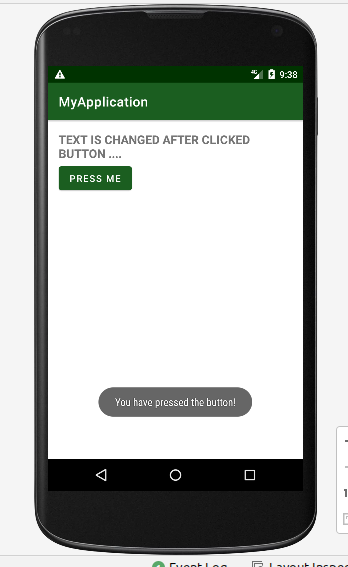
Binding Button with Kotlin Code in Android Studio Mobile Apps
At first update Activity_main.xml file
    <TextView
        android:id="@+id/myTextView"
        android:layout_width="wrap_content"
        android:layout_height="48dp"
        android:layout_gravity="center_horizontal"
        android:gravity="center_vertical"
        android:text="Text for display"
        android:textAllCaps="true"
        android:textSize="18sp"
        android:textStyle="bold" />

    <Button
        android:id="@+id/button_id"
        android:layout_height="wrap_content"
        android:layout_width="wrap_content"
        android:gravity="center"
        android:text="Press me"/>
Now Update Main_Activity.kt file
package com.smartherd.myapplication

import androidx.appcompat.app.AppCompatActivity
import android.os.Bundle
import android.widget.Button
import android.widget.TextView
import android.widget.Toast

class MainActivity : AppCompatActivity() {
    override fun onCreate(savedInstanceState: Bundle?) {
        super.onCreate(savedInstanceState)
        setContentView(R.layout.activity_main)

        // Target: binding button  with text view and display changed button after click event

        val myBtn =    findViewBy<Button>(R.id.button_id) // assign variable for button

        val myTxt =findViewById<TextView>(R.id.myTextView) // assign variable for text view
       // working with click event
        myBtn.setOnClickListener{
            // display flash message using Toast
            Toast.makeText(this,"You have pressed the button!",Toast.LENGTH_LONG).show()
           // Data changed of text view
            myTxt.text ="Text is changed after clicked button ...."
        }

    }
}
Output: