Today we will create a basic Rest API in Django. Suppose you have a project with products app. In this app, a model is given with the class name Product. The coding of the models.py is
from django.db import models

# Create your models here.
class Product(models.Model):
    productname = models.CharField(max_length=100)
    price = models.DecimalField(max_digits=15, decimal_places=2)

    def __str__(self):
        return self.productname
ok, now will create a rest api for the app products
Step-1: Install djangorestframework
pip install djangorestframeworkStep-2: Create an app name “api”
python manage.py startapp apiStep-3: create a file named serializers.py and the write the below code
from rest_framework import serializers
from products.models import Product

class ProductSerializer(serializers.ModelSerializer):
    class Meta:
        model = Product
        # ('__all__')  for all fields
        # for custom fields:
        # fields = ['productname', 'price']
        fields = ('__all__')
Step-4: include App name api in the settings file
INSTALLED_APPS = [
    'django.contrib.admin',
    'django.contrib.auth',
    'django.contrib.contenttypes',
    'django.contrib.sessions',
    'django.contrib.messages',
    'django.contrib.staticfiles',
    'products',
    'api',
    'rest_framework',
]
Step-5: Now go to Views.py under api app and write the below code
from products.models import Product
from .serializers import ProductSerializer
# Create your views here.
class ProductAPIView(generics.ListAPIView):
    queryset = Product.objects.all()
    serializer_class = ProductSerializer
Step-6: Setup project urls.py
from django.contrib import admin
from django.urls import path, include

urlpatterns = [
    path('admin/', admin.site.urls),
    path('api/', include('api.urls')),

]
Step7: Now create urls.py under api apps urls.py and write the below code
from django.urls import path
from .views import ProductAPIView

urlpatterns = [
    path('products/', ProductAPIView.as_view()),
]
Now run the server by the below code
python manage.py runserverStep-8: Now follow URL to see the get data through rest api
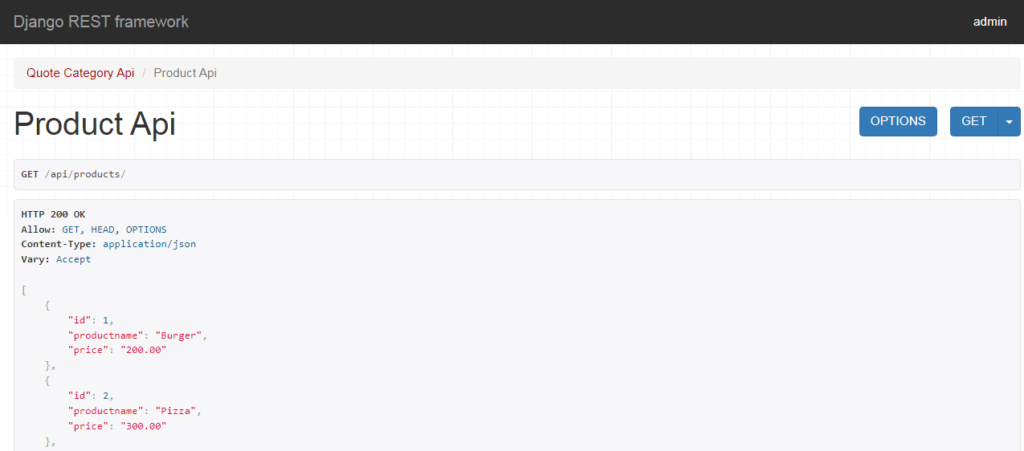
http://127.0.0.1:8000/api/products/Finally, you will see the below data in browser
[fb_button]